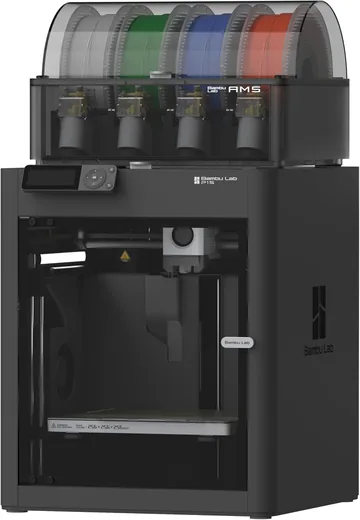
- Best value
Bambu Lab P1S Combo
The one we bought. Fast, enclosed and prints four colors with the AMS. Great for PLA and PETG.
Check price on Amazon - Best upgrade
Bambu Lab P2S Combo
Touchscreen, quick-swap hardened nozzle and an AMS 2 Pro that dries filament. Same build size as the P1S.
Check price on Amazon - Best for big prints
Bambu Lab H2S Combo
More than twice the build space, a heated chamber and a 350°C hotend for tough filaments.
Check price on Amazon
We love our Bambu Lab P1S Combo. But picking it took a while! Bambu sells a lot of printers, and the names don't help much. P1S, P2S, H2S, H2D, H2C... It took us some time to figure out what actually changes from one to the next.
This is the comparison we wish we'd had. We'll go through the P1S, the P2S and the H2S, what each one adds, and who each one is really for. We own the P1S, so that's where our hands-on notes come from. For the P2S and H2S, we're going by Bambu Lab's specs and what we learned while shopping.
Why Picking the Right Printer Matters
The price gap between these three is big. The P1S Combo costs a little over a third of the H2S Combo.
Buy too little printer and you can hit a wall later, like a print that's too big for the bed or a filament your printer can't handle. Buy too much and you've spent hundreds of dollars on features you never use. That money could have bought a lot of filament!
There's also the space question. The H2S is a lot bigger and heavier than the other two, as you can see in the drawing at the top. Make sure you have a spot for it before you fall in love with it.
P1S vs P2S vs H2S at a Glance
Here's how the three compare. These are the combo versions, which include the AMS for multicolor printing. Specs are from Bambu Lab, and prices are what we saw in October 2026. Prices change a lot, especially during sales, so check before you buy.
| P1S Combo | P2S Combo | H2S Combo | |
|---|---|---|---|
| Price with AMS | $549 | About $769 | About $1,499 |
| Printer only | $399 | $549 | About $1,199 |
| Build volume | 256 x 256 x 256 mm | 256 x 256 x 256 mm | 340 x 320 x 340 mm |
| Top speed | 500 mm/s | 600 mm/s | 1,000 mm/s |
| Hottest nozzle temperature | 300°C | 300°C | 350°C |
| Nozzle | Stainless steel | Hardened steel, quick-swap | Hardened steel, quick-swap |
| Extruder | Standard stepper motor | Servo motor | Servo motor |
| Heated chamber | No | No | Yes, up to 65°C |
| Hottest bed temperature | 100°C | 110°C | 120°C |
| Screen | Small screen with buttons | 5-inch touchscreen | 5-inch touchscreen |
| Cameras | 720p | 1080p | 1080p, plus a toolhead camera |
| AMS in the combo | AMS | AMS 2 Pro (dries filament) | AMS 2 Pro (dries filament) |
| Laser and cutter | No | No | Optional |
| Outside size | 389 x 389 x 458 mm | 392 x 406 x 478 mm | 492 x 514 x 626 mm |
Bambu Lab P1S: The One We Bought
- Price (combo)
- $549
- Build volume
- 256 x 256 x 256 mm
- Top speed
- 500 mm/s
- Best for
- PLA, PETG, TPU, ABS and ASA
- Comes with
- AMS for four colors
The P1S is the printer we use every week. It's enclosed, fast and easy. Out of the box it prints PLA, PETG, TPU, ABS and ASA, which covers almost everything a family prints: toys, dragons, organizers, gifts and fixes around the house.
It's not fancy, though. The screen is small and uses buttons. The camera is low resolution with a low frame rate, so time-lapses look choppy. The stock nozzle is stainless steel, so carbon fiber and other abrasive filaments need a hardened steel nozzle swap first. And the original AMS in the combo doesn't dry filament.
None of that has bothered us much. We fixed the humidity problem with rechargeable silica gel, and for the kind of things we make, we haven't wished for a different printer.
Who it's for: families, beginners and anyone who mostly prints PLA and PETG and wants the best value.
Bambu Lab P2S: The Upgrade We Skipped
- Price (combo)
- About $769
- Build volume
- 256 x 256 x 256 mm
- Top speed
- 600 mm/s
- New over the P1S
- Touchscreen, servo extruder, quick-swap hardened nozzle
- Comes with
- AMS 2 Pro, which dries filament
The P2S is the newer printer in the same family, and it borrows a lot from Bambu's bigger H series. The build volume is exactly the same as the P1S, so it can't print anything bigger. What you get is a nicer printer to live with:
- A 5-inch touchscreen instead of the small screen and buttons.
- A servo motor extruder with about 70% more pushing force. It also keeps an eye out for clogs while it prints.
- A hardened steel nozzle with a quick-swap clip. Carbon fiber and glass fiber filaments work right out of the box, and changing nozzle sizes is quick.
- A 1080p camera with a smooth live view and better AI error detection.
- Adaptive airflow that pulls in cool outside air for PLA and keeps the heat in for ABS.
- The AMS 2 Pro in the combo, which can dry filament at up to 65°C.
The P2S still has no heated chamber, and its nozzle tops out at 300°C, just like the P1S. When we were shopping, the P2S Combo cost about $220 more than the P1S Combo, and we decided we'd rather spend that on filament. We go into the details in our P1S Combo review.
Who it's for: anyone who wants a smoother day-to-day experience, plans to try carbon fiber or glass fiber filaments, or lives somewhere humid and wants drying built in.
Bambu Lab H2S: The Big One
- Price (combo)
- About $1,499
- Build volume
- 340 x 320 x 340 mm
- Top speed
- 1,000 mm/s
- Heated chamber
- Up to 65°C
- Hottest nozzle
- 350°C
The H2S is a different kind of printer. It's built on the same base as Bambu's H2D, but with one nozzle instead of two, which brings the price down. Here's what it adds over the P2S:
- More than twice the build space. That's about 37 liters vs about 17 liters. Cosplay helmets, big vases, tall storage bins and props can print in one piece instead of being split into parts and glued.
- A heated chamber. It warms the air inside up to 65°C. That helps big ABS and ASA prints stop warping and cracking, and it's needed for engineering filaments like nylon blends and PPS.
- A 350°C hotend, hot enough for high-temperature filaments the P1S and P2S can't print.
- Faster moves, up to 1,000 mm/s.
- A toolhead camera on top of the live view camera.
- Laser and cutting options. The Laser Full Combo (about $2,099) adds a 10W laser for engraving and cutting thin wood, plus a cutting module for vinyl and paper.
The downsides are real, though. It costs roughly three times as much as the P1S Combo. It weighs about 30 kg (66 lb), so it needs a sturdy table and probably two people to move it. It can pull up to 1,170 watts from a regular US outlet while everything heats up. And it's about 63 cm (almost 25 inches) tall before you put an AMS on top.
Bambu also makes the H2D, which has two nozzles so it can switch between two materials with much less purging, and the H2C, which can swap between several hotends on its own. Both cost more than the H2S.
Who it's for: makers who print big things, need engineering filaments or want laser engraving in the same machine. For most families, it's more printer than you need.
How the AMS Feeds Four Colors
All three printers come in a combo with an AMS (Automatic Material System). It holds four spools and switches between them during a print, so you can print a green dragon with gold wings in one go. Here's what happens every time the color changes:
- Cut. A small cutter in the toolhead snips the filament.
- Pull back. The AMS winds the old filament back onto its spool.
- Feed. The next spool turns and pushes its filament through the hub and the tube to the toolhead.
- Purge. The toolhead moves over the purge chute and pushes out filament until the old color is gone.
- Print. Back to the model with the new color.
Those purged blobs add up fast. A print with lots of color changes can make a surprising pile of waste, which is why we added a purge bin to our P1S. Using fewer colors, or grouping colors by height, cuts it way down.
AMS vs AMS 2 Pro
The P1S Combo comes with the original AMS. The P2S and H2S combos come with the AMS 2 Pro, which adds a heater that can dry filament at up to 65°C while it sits in the box. That's handy, because damp filament prints stringy, bubbly and brittle.
We didn't find the dryer necessary. A few dollars of rechargeable silica gel took our AMS humidity from D to A, and we keep spare spools in sealed storage boxes. If you live somewhere very humid, or you print a lot of nylon or TPU, the built-in dryer makes more sense.
Does the Extra Speed Matter?
On paper, the H2S is twice as fast as the P1S. In real life, the gap is smaller than it sounds. Printers only reach top speed on long, straight moves, like infill and travel. Outer walls, small details and overhangs print slower on every printer so they look good, and small prints need time to cool between layers.
For the toys and gifts we print, the P1S already feels quick. Extra speed matters most on big prints, and that's where the H2S shines anyway.
Which Filaments Can Each One Print?
| Filament | P1S | P2S | H2S |
|---|---|---|---|
| PLA, PETG and TPU | Yes | Yes | Yes |
| ABS, ASA and PC | Yes | Yes | Yes, and the heated chamber helps big parts |
| Carbon fiber, glass fiber and nylon blends | After a hardened steel nozzle swap | Yes | Yes |
| PPS and PPS-CF | No | No | Yes |
Not sure what any of those are? Our guide to Bambu Lab filament types explains each one in plain English. Most families will be happy with PLA and PETG for a long time.
Where Will It Go? Size, Weight and Fumes
Measure before you buy. Here's the outside size of each printer, without the AMS:
- P1S: 389 x 389 x 458 mm (about 15.3 x 15.3 x 18 inches)
- P2S: 392 x 406 x 478 mm (about 15.4 x 16 x 18.8 inches)
- H2S: 492 x 514 x 626 mm (about 19.4 x 20.2 x 24.6 inches)
In the combo setup, the AMS usually sits on top, so leave room above for it and for lifting the lid. Leave a few inches behind the printer too, for the filament tubes and the purge waste.
Wherever it goes, think about the air. Being enclosed helps, but ABS and ASA give off more fumes and particles than PLA. We cover what we learned in our P1S review, including the HEPA filter upgrade we added.
Which One Should You Buy?
- Get the P1S Combo if you mostly print PLA and PETG, you're new to 3D printing, or you'd rather spend the savings on filament. That's what we did, and we haven't regretted it.
- Get the P2S Combo if you want the touchscreen, the quick-swap hardened nozzle and built-in filament drying, or you plan to print carbon fiber blends. It's the easiest everyday upgrade.
- Get the H2S Combo if you want big prints in one piece, plan to print nylon, PPS or large ABS parts, or like the idea of adding a laser later. Just make sure you have the room and the budget.
P1S vs P2S vs H2S FAQ
Is Bambu Lab still selling the P1S?
Yes. When we checked in October 2026, Bambu still sold the P1S alongside the P2S in its US store, and the P1S Combo was still on Amazon.
Can the P1S print carbon fiber?
Yes, with an upgrade. Swap in Bambu's hardened steel hotend first. The stock stainless steel nozzle wears out quickly with abrasive filaments.
Can I add an AMS later?
Yes. All three printers are sold without an AMS too, and you can add one later. The combo usually costs less than buying the two separately, though.
What's the difference between the H2S and the H2D?
The H2D has two nozzles, so it can print two materials, like PLA with a support material, with much less purging. The H2S has one nozzle and costs less.
Do I need the AMS 2 Pro's dryer?
Not usually. Silica gel does a good job with PLA and PETG. The dryer helps most in very humid homes and with filaments that soak up moisture, like nylon and TPU.
The Bottom Line
All three are great printers. The difference is what you plan to make. For most families, the P1S Combo is the best value, and it's the one we chose. The P2S Combo is a nicer printer to use every day if the extra cost doesn't bother you. And the H2S is the one to get when your ideas outgrow a 256 mm build plate.
Whichever one you pick, start with the right filament and keep it dry. Happy printing!